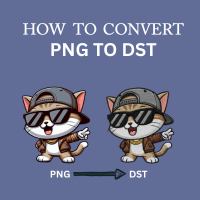
How to Convert PNG to DST for Embroidery: A Step-by-Step Guide
If you are new to the world of custom apparel, you might be wondering why you can’t simply open your company logo in Photoshop or Paint and “Save As” a DST file. It is the most common question we answer at Sassy Digitizing.
The short answer is: An image is made of pixels, but a DST file is made of instructions.
In this guide, we will break down exactly how to bridge that gap and convert your PNG images into stitch-ready files for your embroidery machine.
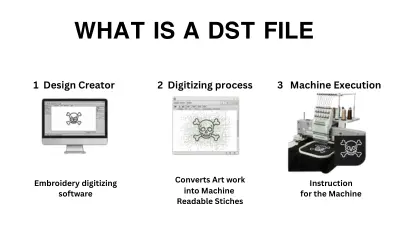
What is a DST Files?
A DST file is a specific format originally created by Tajima (but used by almost all commercial machines) that tells the machine three specific things:
- Coordinates: X and Y movements (Where to move the needle).
- Trims: When to cut the thread.
- Stops: When to pause for a color change.
A PNG file, on the other hand, is just a flat grid of colored dots. Your machine doesn’t know how to turn those dots into stitches without specific digitizing instructions.
Can I use a Free Online Converter ?
You will find many websites claiming to “Convert PNG to DST Online for Free.” Be careful. These tools use “Auto-Digitizing.” While they can produce a file that the machine can read, the results are often messy, leading to thread breaks and puckering on the final fabric.
How the Professional Conversion Process Works
To get a clean result, you (or a professional digitizer) must “trace” the artwork using specialized software.
- Import the PNG: Load your image into software like Wilcom, Hatch, or Pulse.
- Define Stitch Types: Assign Satin stitches for borders and Tatami fills for large areas.
- Set the Pathing: Tell the machine where to start and stop to avoid messy jump stitches.
- Export as DST: Once the pathing is set, you save the file as a DST.
Converting PNG to DST isn’t just a file format change it’s an art form. If you want instant results, you can try auto-software. But if you need a file that won’t break needles, utilizing a professional service is your best friend.
About the Author Keith Blair | Senior Quality Control (HOD) Keith Blair serves as the Head of Department for Quality Control at Sassy Digitizing, bringing 12 years of commercial embroidery experience to the team. His role focuses on the technical mechanics of digitizing, specifically adjusting stitch densities and lengths to suit different fabric types.
A specialist in advanced production methods, Keith oversees the digitizing standards for complex 3D puff, appliqué, and small lettering projects. He ensures that every file is tested for efficiency and run-ability before it reaches the customer, bridging the gap between digital design and physical production.